
Meebhoomi AP (మీ భూమి) – Andhra Pradesh Land Records
Quick Answer – What is Meebhoomi (మీ భూమి – “Your Land”) is the official online land records portal launched in June 2015 by the Revenue Department, Government of Andhra Pradesh. It lets every AP citizen view, verify, and download land documents – Adangal, ROR 1B, FMB, Village Maps, and E-Passbook, free of charge at meebhoomi.ap.gov.in, without visiting any government office.
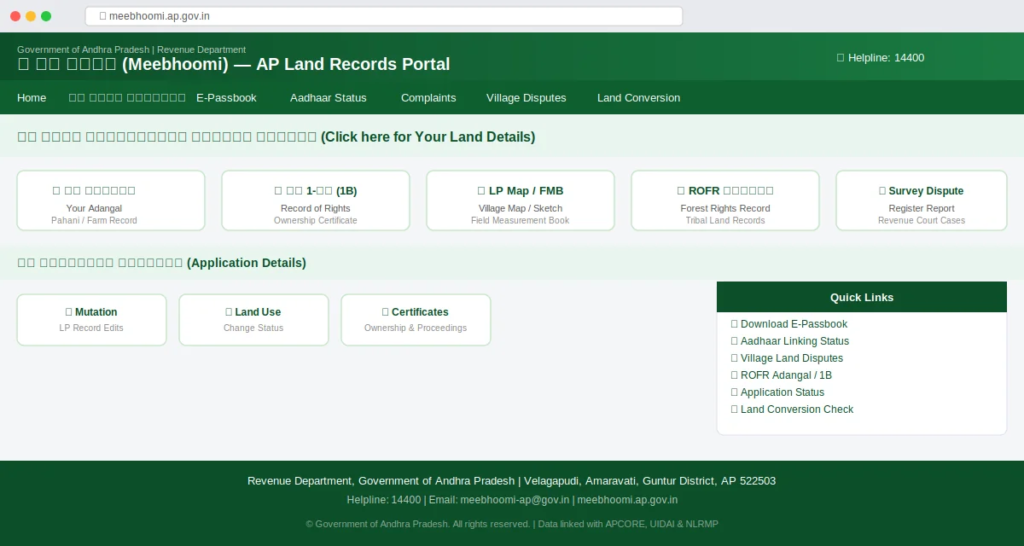
| Official portal | meebhoomi.ap.gov.in |
| Launched | June 2015 – Government of Andhra Pradesh |
| Managed by | Revenue Department, GoAP – CCLA (Commissioner of Land Records) |
| Districts covered | All 26 districts of Andhra Pradesh |
| Language | Telugu and English |
| Cost to view | Free. Certified copies from MeeSeva cost ₹40. |
| Helpline | 14400 (toll-free) | meebhoomi-ap@gov.in |
| Available | 24 hours, 7 days a week |
What you need before you start
Keep these details ready before you open the portal. Without them, you cannot search for any record.
- 🔢 Survey Number or LP Number
- 📋 Khata / Account Number
- 🪪 Aadhaar Number (for passbook)
- 📱 Registered Mobile Number
- 📍 District, Mandal & Village name
1. All Meebhoomi Services & Charges (2026)
Mee bhoomi gives you two groups of services, land record viewing and account management. Here is everything the portal currently offers, along with exact costs.
| Service | Access Point | Cost |
|---|---|---|
| View Adangal / Village Adangal (Pahani) | meebhoomi.ap.gov.in | FREE |
| View ROR 1B / Village 1B | meebhoomi.ap.gov.in | FREE |
| View FMB / LP Map / Village Map | same | FREE |
| ROFR Adangal / Village 1B (tribal records) | meebhoomi.ap.gov.in | FREE |
| Download E-Passbook (Pattadar Passbook) | mee bhoomi.ap.gov.in (OTP required) | FREE |
| Aadhaar Linking Status check | same | FREE |
| Village Land Dispute table | mee bhoomi.ap.gov.in | FREE |
| Survey Number Dispute Register Report | meebhoomi.ap.gov.in | FREE |
| Mutation / Application Status check | mee bhoomi.ap.gov.in | FREE |
| BhuNaksha AP (cadastral satellite map) | bhunaksha.ap.gov.in | FREE |
| Certified copy of ROR 1B | MeeSeva center | ₹40 |
| Certified copy of Adangal | MeeSeva center | ₹40 |
| Certified FMB / LP Map copy | MeeSeva center | ₹40 |
| Mutation Application | MeeSeva / Tahsildar | ₹150 |
| Adangal / Pahani correction | MeeSeva center | MeeSeva service fee |
💡 Key rule: Viewing and downloading for personal reference is always free. You only pay when you need an officially stamped certified copy, and that goes through MeeSeva, not Mee bhoomi directly.
2. How to Use Meebhoomi, Step-by-Step Guides
How to login to Meebhoomi portal
The portal uses mobile OTP login. No password or username required, just your mobile number linked to your land account.
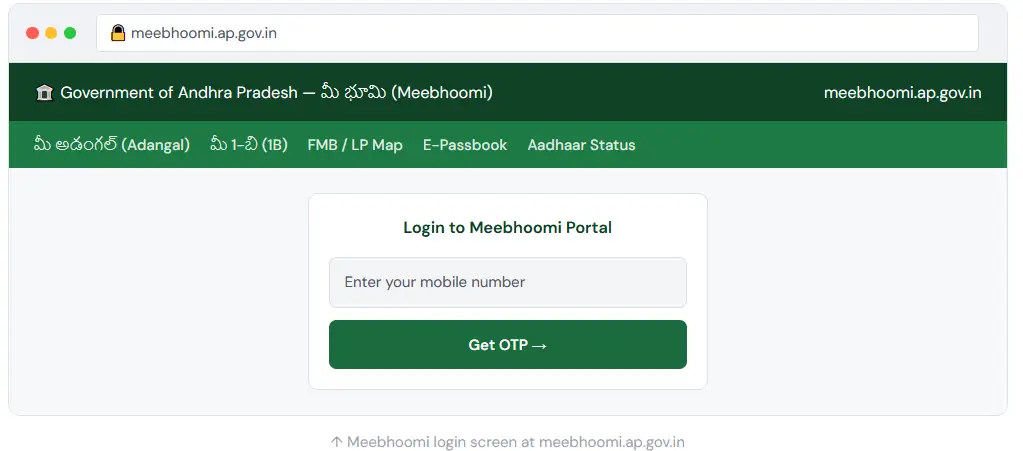
- 1 Open meebhoomi.ap.gov.in
Use Chrome or Firefox. Avoid third-party apps, they are not official. Only the government website is safe and accurate.
- 2 Enter your mobile number and click “Get OTP“
Type the mobile number linked to your land account (the Aadhaar-linked number). A 6-digit OTP arrives within 30 seconds.
- 3 Enter OTP and click “Verify OTP“
You are now inside the portal. All services, 1B, Adangal, FMB, E-Passbook, appear on the homepage dashboard.
⚠️ Avoid peak hours
The portal is slowest from 10 AM to 2 PM. Try before 9 AM or after 7 PM for fastest access. Desktop browsers are more reliable than mobile browsers during busy periods.
How to check and download Adangal (Pahani)
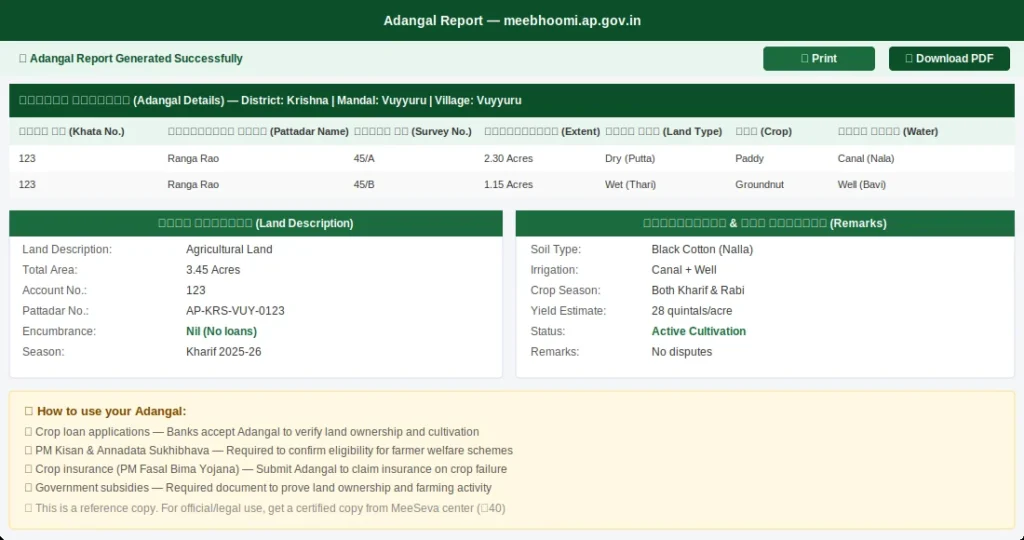
The Adangal is your land’s current farming record. It shows who cultivates the land, what crop grows, soil type, water source, and any outstanding loans. Banks ask for Adangal when you apply for a crop loan or PM Kisan eligibility.
Path: Homepage → మీ భూమి వివరాలకోసం క్లిక్ చేయండి → మీ అడంగల్ / గ్రామ అడంగల్
- 1 Click “మీ అడంగల్ / గ్రామ అడంగల్”
- This option appears under “మీ భూమి వివరాలకోసం క్లిక్ చేయండి” on the main dashboard. It is the first option in the land details row.
- 2 Select District → Mandal → Village
- Use the dropdown menus in order. Double-check the village name, many villages share similar names across different mandals.
- 3 Choose record type and enter Khata Number
- Select “Adangal” then choose “One Khata Number.” Enter your Khata (account) number in the text box. For an entire village record, choose “Entire Village.”
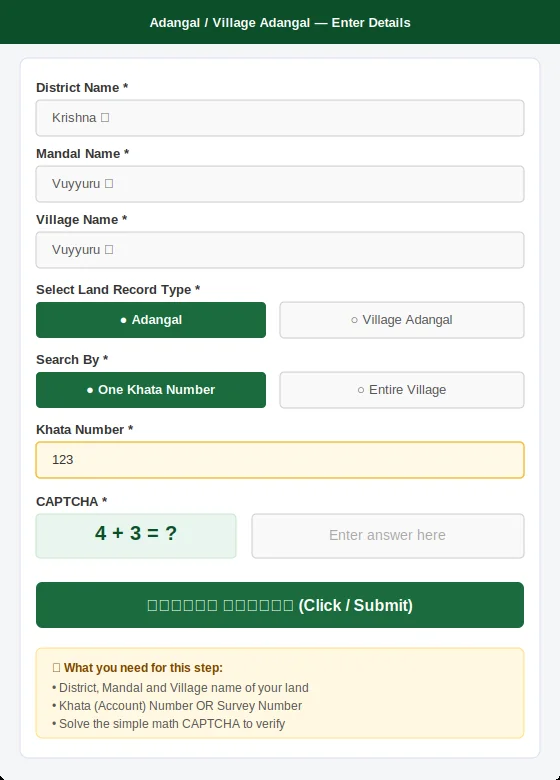
4 Solve the CAPTCHA
The CAPTCHA shows a simple math sum (e.g., 4 + 3 = ?). Enter the answer in the box next to it.
5 Click “క్లిక్ చేయండి” and view your Adangal
Your Adangal report appears on screen. It shows owner name, land area, water source, crop details, loan status, and more. Click Print to save as PDF.
💡 Use of Adangal: You need your Adangal for crop loans, PM Kisan eligibility, Annadata Sukhibhava, crop insurance (PM Fasal Bima Yojana), and government subsidies. Banks verify cultivation details from this document before processing your loan.
How to view and download ROR 1B (Record of Rights)
The 1B is your land’s legal ownership certificate. It carries your name, survey number, land extent, and full ownership history. You need this for bank loans, property sale, court cases, and government scheme benefits. Unlike Adangal, the 1B focuses on who owns the land, not who farms it.
Path: Homepage → మీ భూమి వివరాలకోసం క్లిక్ చేయండి → మీ 1-బి / గ్రామం 1-బి
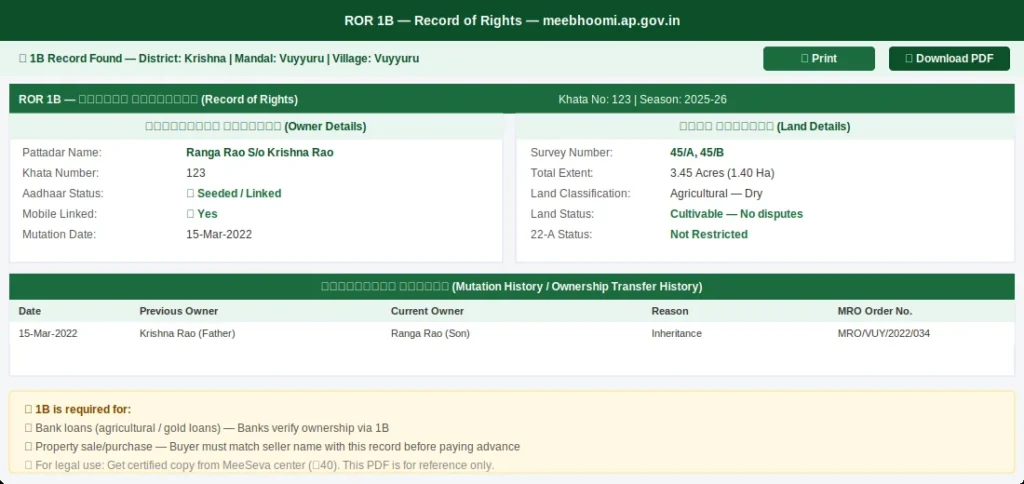
- 1. Click “మీ 1-బి / గ్రామం 1-బి”
This sits directly next to the Adangal option on the homepage. Click it to open the 1B search form.
- 2. Select District, Mandal, Village, then choose search type
You can search by Khata Number, Survey Number, or Aadhaar Number. If searching by Pattadar name and getting no results, try the surname only, revenue records often store names with initials first.
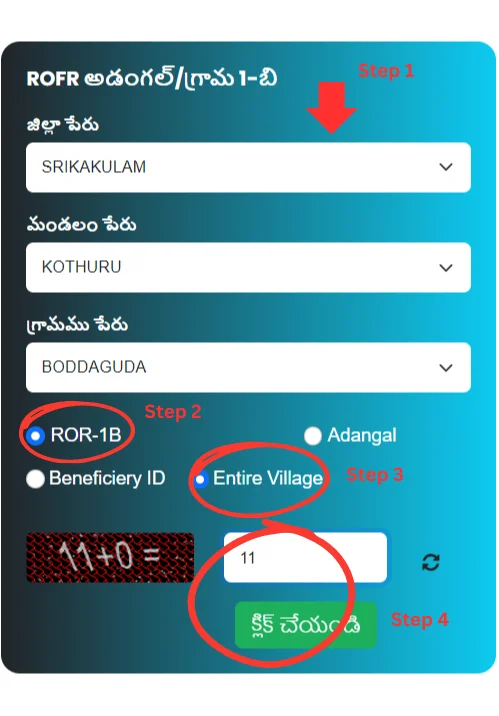
- 3. Solve CAPTCHA and click “క్లిక్ చేయండి”
Your 1B record appears on screen showing owner name, Khata number, survey number, land extent, land classification, and full mutation history.
- 4. Download or print your 1B
Click Print / Download PDF. This copy is for your reference. For bank loans or legal use, get a certified copy from MeeSeva (₹40), the reference copy alone may not be accepted in court.
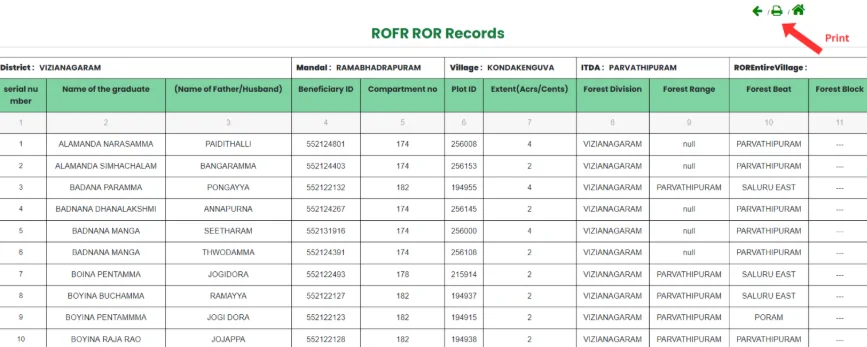
ℹ️ 1B vs Adangal – quick difference: 1B = Who legally owns the land (ownership certificate). Adangal = Who is farming it this season (cultivation report). For bank loans, you typically need both. For property sale, the 1B is the critical document.
How to download your E-Passbook (Pattadar Passbook)
The E-Passbook is the digital Pattadar Passbook. It combines your 1B ownership data and Adangal cultivation details in one digitally signed document. Since 2026, all AP banks require Aadhaar-seeded land before they process agricultural or gold loans.
1 Click “ఎలక్ట్రానిక్ పాస్ పుస్తకం డౌన్లోడ్” on the homepage
- This is a separate button on the Meebhoomi homepage, not inside the land details section. Look for it in the main quick-links area.
2 Select District, Mandal, Village, enter Account Number
- Enter your Khata (Account) Number. The system checks whether your mobile is linked to this account before sending an OTP.
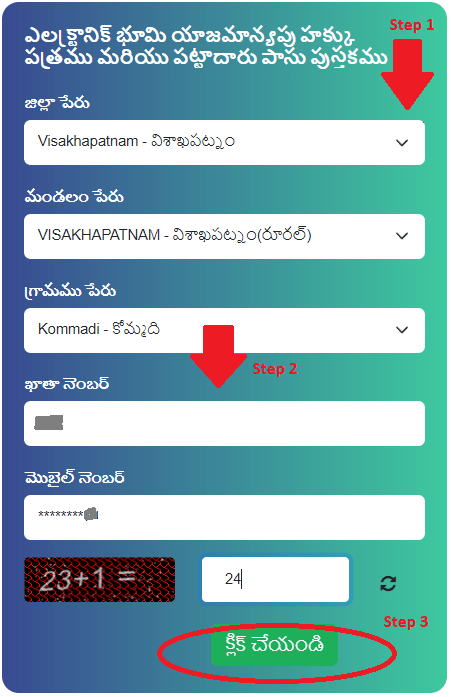
3 Enter CAPTCHA and click
- The system verifies your account and checks whether your Aadhaar-linked mobile is active and registered.
4 Enter OTP sent to your registered mobile
- A 6-digit OTP arrives on your linked mobile. Enter it and click OK. Your passbook PDF appears immediately.
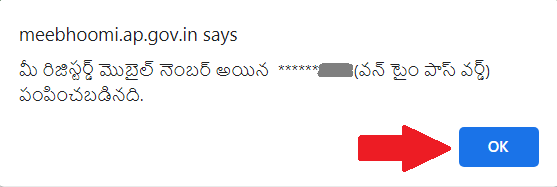
5 Download your E-Passbook PDF
- The digitally signed passbook is now on screen. Save it, banks and government offices across AP accept this as a valid document.
⚠️ OTP not arriving? Your mobile number is not linked to your land account. Visit your nearest MeeSeva center or Tahsildar office with your Aadhaar card and land documents to update it. You cannot fix this from inside the portal.
How to access FMB (Field Measurement Book) and LP Map
The FMB shows the boundary sketch of your land, exactly where your plot ends and your neighbour’s begins. The LP Map (Land Parcel Map) is the newer GPS-accurate version created during AP’s re-survey. If your area was re-surveyed, you have an LP Number instead of just a Survey Number.
Path: Homepage → మీ భూమి వివరాలకోసం క్లిక్ చేయండి → మీ L.P Map / FMB / గ్రామ పటం
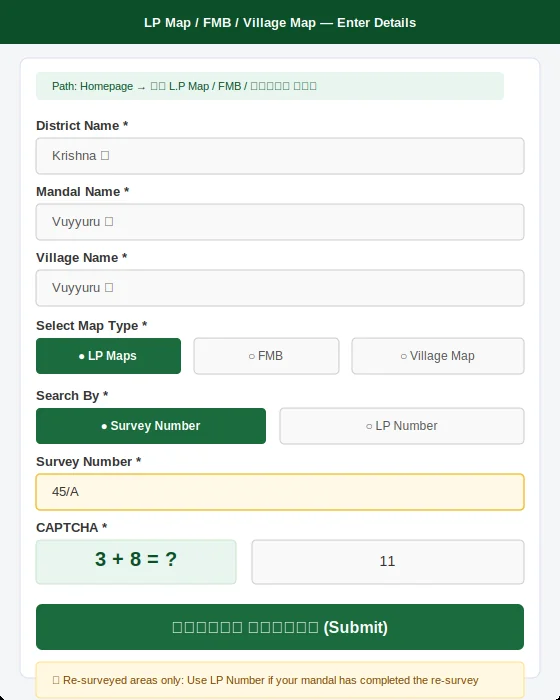
- 1 Click “మీ L.P Map / FMB / గ్రామ పటం”
- This option is in the main land details section on the homepage.
- 2. Select District, Mandal, Village, then choose map type
- Choose between LP Maps, FMB, or Village Map based on what you need. For boundary disputes, choose FMB or LP Map.
- 3. Enter Survey Number or LP Number
- If your area was re-surveyed, use the LP Number (check your passbook or Adangal to find it). If not re-surveyed, use the old Survey Number.
- 4. Solve CAPTCHA and submit
- The FMB sketch or LP Map appears. Download or print it for reference.
⚠️ For boundary disputes in court: The Meebhoomi FMB is a reference sketch only. For legal proceedings, get a certified FMB copy from MeeSeva (₹40) or request a physical demarcation by revenue officials. Courts require the certified version.
How to check Aadhaar linking status
Path: Homepage → Aadhaar Linking Status (ఆధార్ లింకింగ్ స్టేటస్)
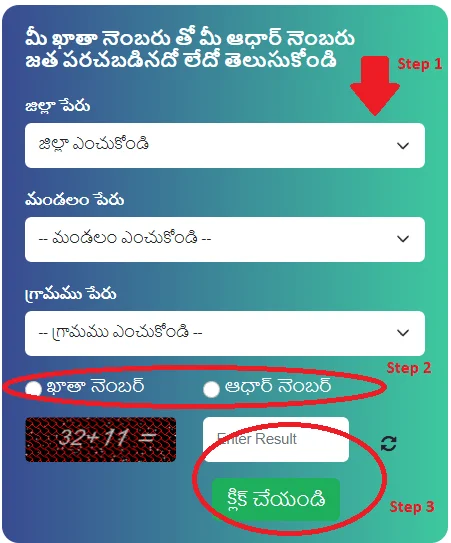
1 Click “Aadhaar Linking Status” on the homepage
- It appears in the quick-links section, separate from the land details menu.
2. Select District, Mandal, Village
- Choose your land’s location from the dropdowns.
3. Enter Khata Number or Aadhaar Number, solve CAPTCHA
- Either number works. The result shows instantly, Seeded or Not Seeded.
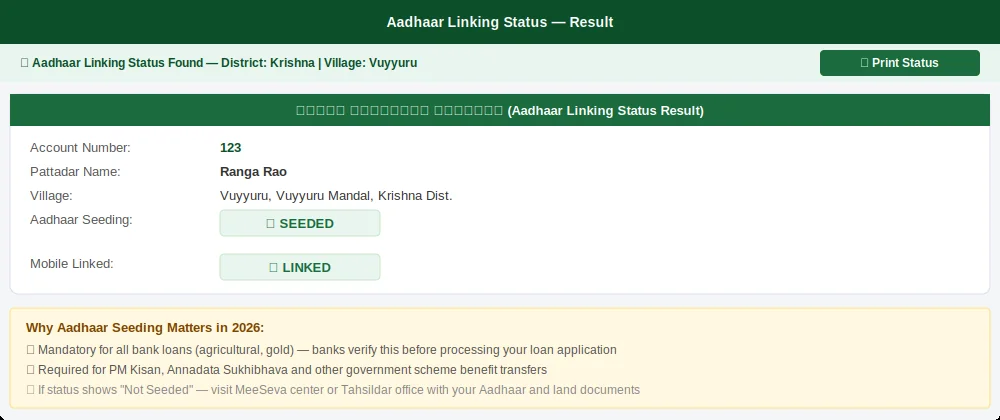
2026 bank rule – check this before visiting any bank
All AP banks now require your land to be Aadhaar-seeded before approving agricultural or gold loans. If your status shows “Not Seeded,” visit MeeSeva or your Tahsildar with your Aadhaar card and land documents before you apply for any loan, otherwise the bank will reject your application on the spot.
How to check village land disputes
Path: Homepage → గ్రామ భూవివాదముల పట్టిక (Village Land Disputes)
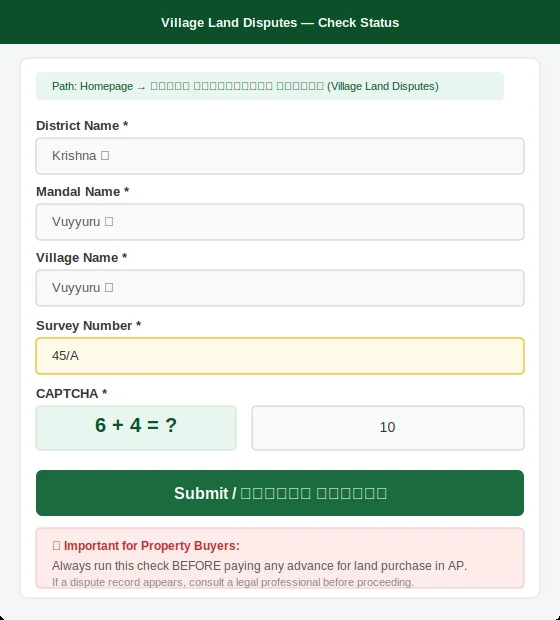
- 1 Click “గ్రామ భూవివాదముల పట్టిక” on the homepage
- This is in the quick-links section. It opens the dispute lookup form.
- 2. Select District, Mandal, Village – enter Survey Number
- Enter the exact survey number of the land you want to check.
- 3. Solve CAPTCHA and submit
- If a dispute exists, the result shows Dispute ID, Court Name, Case Number, Petitioner/Respondent names, and current status. If the screen shows no records, the plot is dispute-free in the revenue system.
🚨 Property buyers – run this check before paying any advance: If a dispute appears on this search, do not pay any advance or sign any agreement without getting legal advice first. A single land sale in AP can involve multiple court cases, this lookup could save you lakhs of rupees.
3. Meebhoomi vs MeeSeva – The Difference Explained
This is the most common source of confusion for AP landowners. People go to Meebhoomi expecting to correct a wrong name or fix a land extent error, and find they cannot do it there. That is because the two portals serve completely different purposes.
💡 Simple rule
Meebhoomi = View and verify. MeeSeva = Apply and correct. Start at Mee bhoomi to see what is in your record. If something needs changing, or you need an official stamped copy, go to MeeSeva or your Mandal Revenue Office (MRO).
| Task | Meebhoomi | MeeSeva |
|---|---|---|
| View Adangal, 1B, FMB online | ✔ Yes – free | ✘ No |
| Download E-Passbook | ✔ Yes – free with OTP | ✘ No |
| Check Aadhaar linking status | ✔ Yes | ✘ No |
| Check dispute / court case status | ✔ Yes | ✘ No |
| Get certified copy of 1B or Adangal | ✘ No | ✔ Yes — ₹40 |
| Correct wrong name or land extent | ✘ No | ✔ Yes |
| Apply for mutation after land sale | ✘ No | ✔ Yes — ₹150 |
| Apply for subdivision patta | ✘ No | ✔ Yes |
| Update mobile number on account | ✘ No | ✔ Yes |
4. Meebhoomi 2026 Updates – What Changed This Year
FEB 2026
Market value revision across AP
Guideline values in urban and high-growth areas rose 5–15%. Check the IGRS Market Value tool before any land transaction, 2025 rates are now outdated and using them will give you a wrong stamp duty estimate.
2026 ROLLOUT
Auto-mutation live in all 26 districts
After sale deed registration at the Sub-Registrar office, your Meebhoomi record updates automatically within 7–15 days. No separate mutation application needed. Track under “Automation Records” in the 1B section.
2026 BANK RULE
Aadhaar seeding mandatory for loans
All AP banks now require Aadhaar-seeded land before approving agricultural or gold loans. Check your status on Meebhoomi before you visit any bank, an unseeded account means an instant rejection.
2026 UPDATE
ROFR records now carry QR codes
All tribal land records (ROFR) issued in 2026 carry a scannable QR code. Banks and government offices can verify ownership in seconds — making crop loan processing much faster for ST farmers.
2026 DETAILS
Land conversion split into 3 categories
The portal now separates agricultural land conversion into Residential, Industrial, and Commercial. Using the wrong category for construction can attract heavy fines and legal complications.
KNOWN ISSUE
Mobile app still unreliable
Despite a January 2026 update, the official app holds a 2.9/5 rating and crashes during peak hours. Use the desktop website to download official PDFs. The app works for quick record glances only.
5. Who Uses Meebhoomi and How
🌾 Farmers
- Adangal for crop loan applications
- PM Kisan eligibility via 1B
- Annadata Sukhibhava benefits
- Crop insurance (PM Fasal Bima)
- Verify Aadhaar seeding before bank visit
🏠 Property Buyers
- Verify seller name in 1B matches deed
- Check dispute table before advance payment
- Confirm no loans on Adangal
- Download EC via IGRS portal
- Check IGRS market value to avoid overpaying
🏦 Banks & Lenders
- Verify ownership via 1B record
- Confirm Aadhaar seeding before loan
- Check FMB for collateral boundaries
- Verify ROFR QR code for tribal loans
⚖️ Legal Professionals
- Dispute register data for cases
- 1B as ownership history evidence
- RTI (₹10) if records are blocked
- Certified MeeSeva copies for court
🌿 Tribal Communities
- Access ROFR Adangal and 1B records
- Download QR-verified ROFR documents
- Verify forest rights status online
📌 Property buyers – run this 3-step check before paying any advance: 1. Check seller’s name in 1B matches the sale deed. 2. Search the survey number in the Village Land Dispute table, if a case appears, stop. 3. Check the Adangal to confirm there is no outstanding loan or mortgage. This three-step check protects you from the most common property fraud in AP.
6. Fix Common Meebhoomi Errors (2026)
The portal is generally reliable, but it does throw errors, especially during peak hours. Here are fixes for the seven most common problems.
“Server Busy” error, page won’t load
This happens between 10 AM and 2 PM when traffic peaks.
- Try before 9 AM or after 7 PM – this solves 80% of server-busy complaints.
- Clear browser cache (Ctrl+Shift+Delete) and reload.
- Switch between Wi-Fi and mobile data.
- Try Firefox instead of Chrome, or vice versa.
OTP not received on mobile
The OTP goes to the number registered with your land account – not necessarily your current SIM.
- Check if DND (Do Not Disturb) is active, disable government SMS blocking.
- Wait 2 minutes before requesting again (too many tries block OTP for 15 minutes).
- If the number has changed, visit MeeSeva or Tahsildar with Aadhaar to update it.
“No Records Found” – land record not showing
Almost always an input error, not a system error.
- Double-check survey number, khata number, and village name, one wrong digit returns nothing.
- Try searching by Pattadar name with surname only.
- If the record genuinely does not exist online, file a complaint on the portal or visit your MRO.
Wrong land extent showing in Meebhoomi
Mee bhoomi shows what is stored in the WebLand database. Wrong extent means the database has an error.
- Compare the extent shown across your 1B, Adangal, E-Passbook, and FMB, if they all differ, a revenue workflow is needed.
- For simple data-entry errors, file an Adangal correction via MeeSeva.
- For errors caused by sale, inheritance, or re-survey, apply for Mutation for Corrections through your MRO.
Record not updated after selling land
Auto-mutation is live in all 26 districts as of 2026, but takes 7–15 working days.
- Check “Automation Records” inside the 1B section to see if the transfer is in progress.
- If still pending after 15 days, visit your local MRO with the Application ID and registered sale deed.
- MeeSeva centers can sometimes push updates faster, bring all your documents.
Aadhaar linking failed or shows “Not Seeded”
You cannot fix this from inside Meebhoomi, it requires an offline visit.
- Go to the nearest MeeSeva center or Tahsildar office.
- Carry your original Aadhaar card, 1B record copy, and mobile phone.
- The update takes 1–2 working days after submission.
E-Passbook not downloading
- Use a desktop browser, the passbook PDF generator fails frequently on mobile browsers.
- Disable browser extensions and pop-up blockers.
- Make sure your Aadhaar-linked mobile is active and receiving SMS.
- If the error persists, call helpline 14400 or visit a MeeSeva center.
7. AP Land Records Glossary
AP land records use specific terms that confuse many people. Here is plain-English meaning for every term you will see on Meebhoomi.
Adangal
అడంగల్ (also: Pahani)
The farming record. Shows who cultivates the land, crops grown, soil type, water source, and outstanding loans. Updated every season.
ROR 1B
1-బి / Village Account No. 3
The legal ownership certificate. Shows owner name, survey number, land extent, and full transfer history.
Pattadar
పట్టాదారు
The registered landowner, the person whose name appears in the 1B record as legal titleholder.
Khata Number
ఖాతా నంబర్
Account number for a land-owning household. One Khata can cover multiple survey numbers owned by the same person.
Survey Number
సర్వే నంబర్
Unique number for each individual land parcel. The most specific land identifier on Meebhoomi.
FMB
ఫీల్డ్ మెజర్మెంట్ బుక్
Official boundary sketch of a land parcel — shows exact shape, measurements, and neighbour boundaries. Used in boundary dispute cases.
LP Map
ల్యాండ్ పార్సెల్ మ్యాప్
The modern GPS-accurate digital map replacing FMB in re-surveyed areas. If your area was re-surveyed, you have an LP Number.
Mutation
మ్యుటేషన్
The process of updating land records after an ownership change — sale, inheritance, gift, or court order.
Aadhaar Seeding
ఆధార్ లింకింగ్
Linking your Aadhaar number to your land account. Mandatory since 2026 for bank loans in AP. Prevents fraudulent land transactions.
ROFR
అటవీ హక్కుల గుర్తింపు
Recognition of Forest Rights. Land rights given to Scheduled Tribe farmers for land cultivated inside forest areas under the Forest Rights Act, 2006.
VRO / MRO
రెవిన్యూ అధికారి
VRO = Village Revenue Officer. MRO = Mandal Revenue Officer (senior authority for corrections and complaints).
22-A Land
22-ఎ భూమి
Government prohibited land, cannot be bought, sold, or registered. Always check the 22-A status before any purchase.
Auto-Mutation
స్వయంచాలక మ్యుటేషన్
2026 system where Meebhoomi records update automatically within 7–15 days of sale registration at the Sub-Registrar office.
CCLA
Commissioner of Land Records & Stamps, the apex authority overseeing all land record management in AP, including Mee bhoomi.
FAQs
Is Mee bhoomi completely free to use?
Yes, viewing and downloading all land records on mee bhoomi.ap.gov.in is completely free. You only pay when you need a government-certified printed copy, that service costs ₹40 per document at MeeSeva centers.
What is the difference between 1B and Adangal?
Think of it this way, the 1B is your ownership certificate (who legally owns the land), while the Adangal is your cultivation report (who is farming the land this season, which crops, what soil type). For bank loans, you typically need both. For property sale, the 1B is the critical document.
Can I use Meebhoomi ap records for a bank loan?
Yes, but with one condition, banks accept downloaded Meebhoomi ap records as reference documents. For the actual loan processing, most banks in AP now require a certified copy from MeeSeva (₹40) and verified Aadhaar seeding as of 2026. Some banks also ask you to visit the branch with original passbook documents.
What is ROFR in Mee bhoomi?
ROFR (Rights under the Forest Rights Act) is a special land rights category for Scheduled Tribe farmers and forest-dwelling communities. Their land records appear under the ROFR section on Mee bhoomi, not in the standard Adangal. As of 2026, these records carry QR codes for instant verification.
How do I access old AP land records from 1981?
Mee bhoomi provides access to digitised land records going back to 1981. Search using the old survey number or khata number. If the record does not appear online, it may not yet be digitised, file a complaint on the portal or visit your MRO with the original documents.
9. Contact, Helpline & Where to Go for Offline Help
The Meebhoomi portal solves most issues online, but some situations require a physical visit. Here is exactly where to go and what to bring.
Toll-free helpline
📞 14400
Available during office hours. Call for portal errors, record complaints, and urgent matters. Keep your survey/khata number ready before you call.
Email support
meebhoomi-ap@gov.in
Use for written complaints, record discrepancies, and follow-up on unresolved issues. Include your complaint reference number in the subject line.
Revenue Department office
Revenue Department, Government of Andhra Pradesh
Velagapudi, Amaravati
Guntur District, AP – 522503
Official portal
meebhoomi.ap.gov.in
The only legitimate source for AP land records. Do not use any other website claiming to be Mee bhoomi – all other sites are unofficial.
When to visit in person – and what to bring
| Issue | Where to go | What to bring |
|---|---|---|
| Update mobile number | MeeSeva center or Tahsildar | Aadhaar, land documents, mobile number |
| Aadhaar seeding failure | MeeSeva center or Tahsildar | Aadhaar original + copy, 1B record |
| Correct wrong name or land extent | Mandal Revenue Office (MRO) | Sale deed, old passbook, Aadhaar |
| Get certified record copy | MeeSeva center | ₹40 fee, survey/khata number |
| Mutation application | MeeSeva center or Sub-Registrar | Registered sale deed, ₹150 fee, Aadhaar |
| Complaint stuck over 15 days | MRO with complaint reference ID | Complaint number, Application ID, supporting docs |
| Records not digitised yet | MRO or village VRO | Original physical land documents |
💡 RTI as a last resort: If your records are inaccessible, incomplete, or the authorities are unresponsive, you can file an RTI (Right to Information) application for just ₹10. Submit it to the Public Information Officer (PIO) at your Mandal Revenue Office. The government must respond within 30 days under the RTI Act, 2005.
Disclaimer: This guide is for informational purposes only. It is not affiliated with, endorsed by, or published by the Government of Andhra Pradesh. All land record information must be verified directly on the official portal at meebhoomi.ap.gov.in. Service charges, portal features, and government rules may change. Always consult the official portal or a qualified legal/revenue professional for matters involving land transactions, disputes, or legal proceedings.